
Generate Articles at Scale. Publish to WordPress Automatically.
Nivro generates full AI articles from any topic or keyword and publishes them directly to WordPress in one click. No research step. No copy-pasting. Enter a topic, review the article, configure your WordPress settings, and publish immediately or schedule for a future date. Batch processing lets you queue multiple articles at once and track every generation in real time.
Write Once. Publish Everywhere Your Content Lives.
Nivro handles both the content generation and the publishing automation for social media articles. Enter your topic, let Nivro write the full article, review it in the built-in editor, and push it to your WordPress site with a single click. Scheduled publishing means your content calendar fills itself. Batch generation means you can produce a week of supporting articles in one sitting, not five.
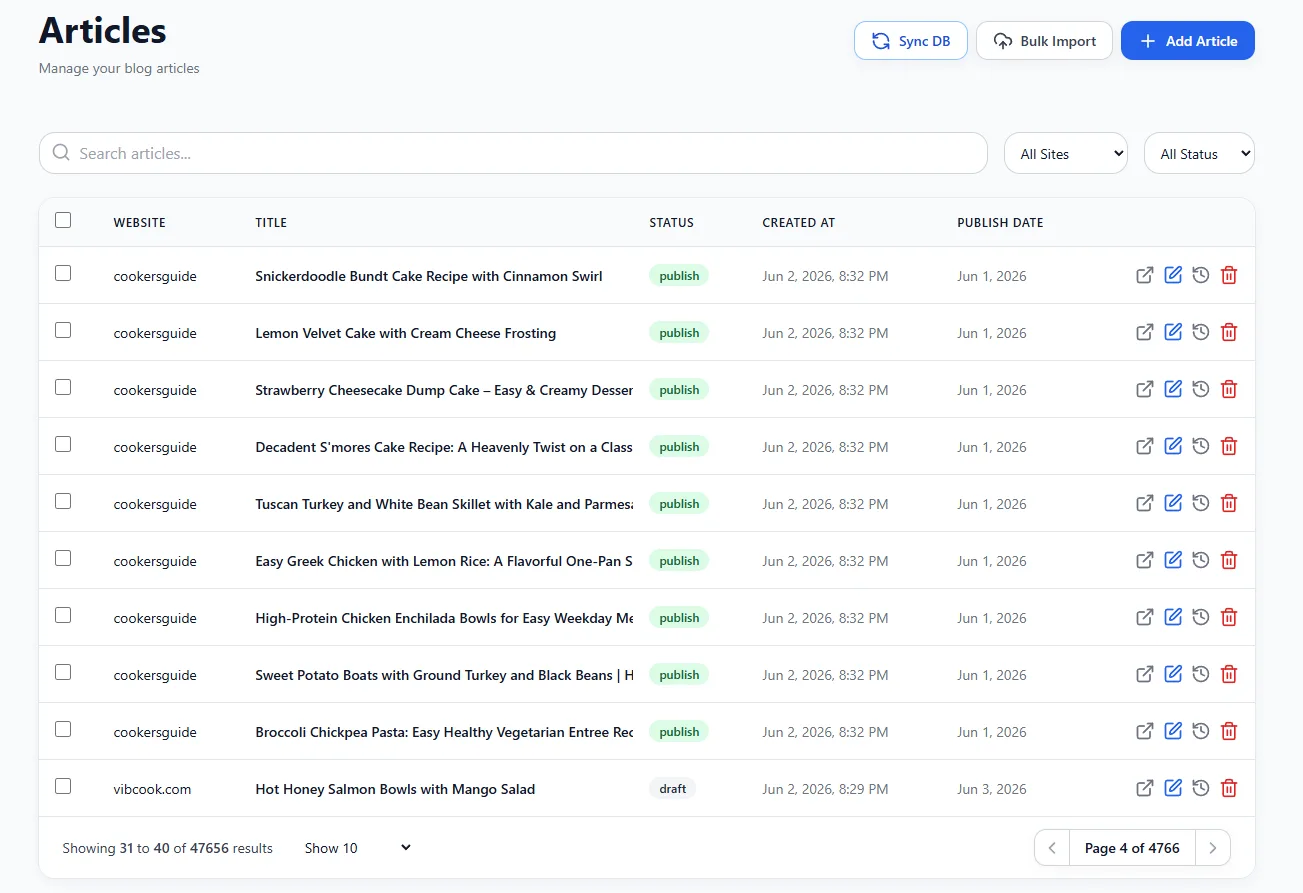
AI Article Generation
Enter any topic and Nivro generates a complete article with proper heading structure, an engaging introduction, and a logical conclusion. No keyword research required. The article is ready to review in the editor immediately after generation completes.
Batch Processing
Add multiple topics to the generation queue in one session. Nivro processes each article simultaneously and shows a live status indicator per article: pending, generating, or done. Come back when the batch is complete and review everything at once.
WordPress Publishing
One-click WordPress export pushes the article with the author, category, tags, featured image, and full SEO metadata to any connected WordPress site. The Bridge plugin writes Yoast or RankMath data automatically so you never have to fill in SEO fields manually.
Scheduled Publishing
Set a target publish date for each article and Nivro schedules it in WordPress automatically. Your content calendar fills without manual action. Generate an entire month of articles in one session and let the schedule handle the rest.
From Topic to Published Post. No Manual Steps.
Enter Your Topic
Type your article topic or a short keyword phrase. No keyword research is required at this stage. The topic can be a broad subject like "sourdough bread tips" or a specific angle like "how to score sourdough for better oven spring." You can add multiple topics at once and queue them as a batch. Each topic becomes one standalone article with its own generation job.
Nivro Generates the Article
Nivro generates the complete article in the background. A status indicator updates from pending to generating to done. The generation process produces a structured article with an H1 title, multiple H2 and H3 sections, an introduction, and a conclusion. If your account has a Style Profile, the article follows your documented tone, sentence length, and formatting preferences.
Review and Edit
Open the article in the rich text editor. Read through the content, adjust any section that needs rewriting, add your own expert commentary, or insert internal links to other articles on your site. The editor supports all standard formatting. Auto-save preserves your edits in the background so nothing is lost between editing sessions.
Configure WordPress Settings
Select the target WordPress site from your connected accounts. Assign an author from the list of users on that site. Choose a category from the existing taxonomy. Add tags, with new ones created in WordPress automatically if they do not exist yet. Attach a featured image by uploading a file or linking from the image generation queue. Every setting is saved with the article for future re-exports.
Publish or Schedule
Publish the article immediately or set a future date for scheduled publishing. When you click export, Nivro pushes the article to WordPress via the REST API along with the featured image, SEO metadata, and all taxonomy assignments. A link to the live WordPress post appears immediately on success. If the article is scheduled, it goes live automatically at the time you set without any further action required.
Who Uses Social Media Articles
Pinterest Content Creators
Every Pinterest pin needs a destination. Social Media Articles lets you generate the supporting blog posts that your pins link to. Create the article, publish it to WordPress, and link the pin to the live URL. Your Pinterest traffic lands on real content instead of generic pages. The article generation keeps pace with your pin output without a separate writing workflow.
Facebook Page Operators
Facebook posts perform better when they link to genuine articles rather than thin content. Use Social Media Articles to generate the blog posts behind your Facebook content strategy. Write the Facebook post in Nivro, generate the article it links to, and publish both in the same session. Your Facebook audience gets a better experience and your site gains real content with every post.
Niche Site Publishers
Building topical depth requires volume. Social Media Articles gives you a fast path to supporting content without the research overhead of the SEO Engine. Use it to fill out content clusters, publish seasonal articles, or cover subtopics that complement your main pillar content. Batch generation keeps your publishing pace consistent even during high-output periods.
Article Generation vs SEO Engine. Which One Do You Need?
Use Social Media Articles when you need volume fast. Use the SEO Engine when you need to rank. Most serious publishers use both.
Questions About Social Media Articles
Social Media Articles are designed for volume and speed. You enter a topic and Nivro generates the full article without running a live SERP analysis. There is no competitor research, no live SEO score, and no semantic terms panel. The SEO Engine is built for articles that need to rank for competitive keywords and includes real-time Google data, competitor analysis, and a live scoring system. Social Media Articles are the right choice when you need content volume fast without the research step.
Yes. You can add multiple topics to the generation queue and Nivro processes them simultaneously. Each article shows a status indicator as it moves from pending to generating to done. You can add new topics to the queue while existing articles are still generating. The batch approach lets you queue an entire week of supporting content in one session and come back when everything is ready to review.
Nivro can do both. You can generate the article and review it in the rich text editor before making any publishing decisions. When you are ready, the WordPress export pushes the full article, featured image, category, tags, and author to your connected WordPress site in one click. You can also set a scheduled publish date so the article goes live at a specific time without any manual action on your part.
Yes. Every generated article opens in a full rich text editor. You can add, delete, or rewrite any section. Update headings, insert new paragraphs, add internal links, or adjust the tone. The editor supports all standard formatting: bold, italic, lists, and heading levels. Auto-save runs in the background, so your edits are preserved even if you close the tab and return later.
Nivro publishes via the WordPress REST API using the free Nivro Bridge plugin. The Bridge plugin adds support for Yoast SEO, RankMath, and SEOPress metadata, so your title tag, meta description, and focus keyword are written automatically. It also supports Tasty Recipes for food bloggers who want to push structured recipe card data alongside the article. Categories and tags are assigned from the WordPress site's existing taxonomy, and new tags are created automatically if they do not exist yet.
Start Generating Articles Today
AI articles from any topic. Batch generation with status tracking. One-click publishing to WordPress. Start producing content at the pace your social strategy demands.